 By
By 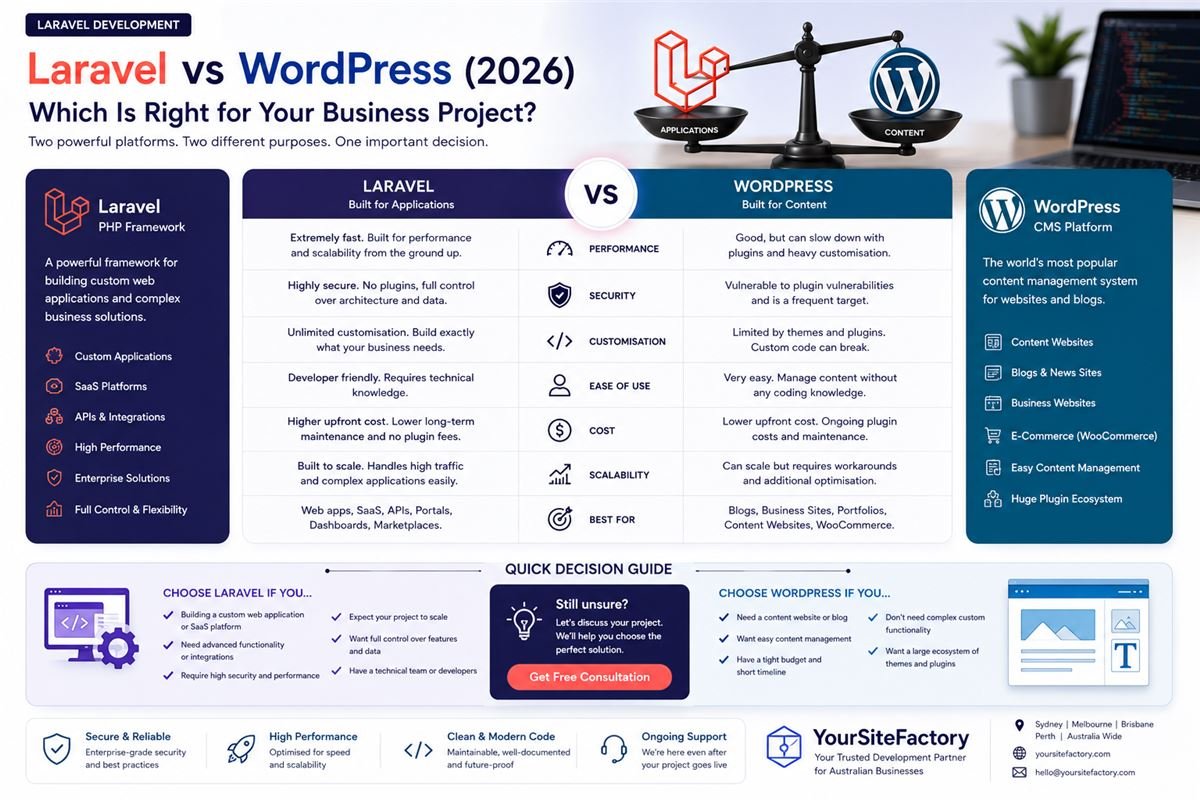
This is one of the most common questions business owners ask before starting a web project. Both Laravel and WordPress are excellent tools but they are built for fundamentally different purposes. Choosing the wrong one does not just waste money. It creates architectural problems you cannot fix without scrapping everything and starting over.
This guide gives you the full honest comparison performance benchmarks, security records, real cost breakdowns, and a clear decision framework so you choose the right tool for your specific situation.
What Is WordPress?
WordPress is a content management system (CMS) that powers approximately 43% of all websites on the internet. It started as a blogging platform in 2003 and evolved into a general-purpose website builder with a massive ecosystem of themes and plugins.
WordPress works by giving you a pre-built system. You install a theme for design and plugins for functionality. A competent non-developer can build a basic website without writing a single line of code.
WordPress is the right choice for:
- Blogs and content-heavy websites
- Basic business brochure sites
- Simple e-commerce stores using WooCommerce
- Marketing teams who need to publish content daily without developer help
- Projects with budgets under $5,000 and tight timelines
What Is Laravel?
Laravel is a PHP framework used by developers to build custom web applications from the ground up. Unlike WordPress, Laravel does not give you a ready-made website it gives developers a powerful, structured toolkit to build exactly what your business needs, nothing more and nothing less.
Laravel is maintained by Taylor Otwell and backed by one of the largest developer communities in the PHP ecosystem. It is the framework behind products like Forge, Envoyer, and Laravel Nova all handling significant production traffic.
Laravel is the right choice for:
- Custom web applications with specific business logic
- SaaS platforms and subscription-based products
- Multi-tenant systems serving multiple clients from one codebase
- High-security applications handling payments or sensitive data
- APIs and backend systems powering mobile applications
- Any project that needs to scale beyond what a CMS can handle
Performance: Laravel Wins at Scale
| Factor | WordPress | Laravel |
|---|---|---|
| Out-of-box speed | Moderate | Fast |
| With caching enabled | Good | Excellent |
| Under heavy traffic | Struggles | Handles well |
| Database efficiency | Moderate | Excellent |
| Typical page load time | 2–5 seconds | Under 1 second |
| Plugin overhead | High | None |
WordPress queries the database on every page request and loads every active plugin regardless of whether that page needs it. A typical WordPress site with 20 plugins runs 50–80 database queries per page load.
Laravel runs only the code your application actually needs. A well-built Laravel application runs 3–10 queries per page load. The difference becomes critical when you have real traffic 10,000 daily visitors on an unoptimised WordPress site regularly causes server strain. The same traffic on Laravel is routine.
Security: Laravel Has a Significantly Better Record
WordPress is the most attacked platform on the internet. In 2024, over 70% of WordPress sites that were hacked were compromised through plugin vulnerabilities not WordPress core itself.
This is not because WordPress is poorly built. It is because its popularity makes it the largest target, and the plugin ecosystem creates an enormous, unpredictable attack surface. Every plugin is a potential vulnerability written by a third-party developer you have never vetted.
Laravel's security advantages:
- No third-party plugins every line of code is written and reviewed by your team
- Built-in CSRF protection on every form by default
- Prepared database statements prevent SQL injection by default
- Bcrypt password hashing built into the authentication system
- Sanctum and Passport provide secure API token management
- Rate limiting middleware prevents brute force attacks
- Attackers cannot study your application structure the way they study WordPress
The bottom line: If your application handles user accounts, payments, medical data, legal documents, or any business-critical information, Laravel is the only defensible choice from a security perspective.
SEO: Depends on What You Are Building
Both platforms can rank on page one of Google. The difference is in control, speed, and flexibility.
WordPress SEO:
- Yoast SEO and RankMath make on-page SEO configuration accessible to non-developers
- Excellent for content sites, blogs, and news publications
- Some technical limitations around URL canonicalisation and cache headers
- Plugin bloat directly hurts Core Web Vitals a confirmed Google ranking factor
- You are dependent on plugin developers keeping up with Google's technical requirements
Laravel SEO:
- Full control over every meta tag, canonical URL, structured data, and HTTP header
- Faster page loads directly improve Core Web Vitals scores
- Custom sitemap generation with precise control over priorities and frequencies
- FAQ schema, BreadcrumbList, and Article schema are implemented exactly as needed
- No plugin conflicts, no unexpected meta tag duplication, no bloated page weight
- Technical SEO is limited only by developer knowledge, not platform constraints
Verdict: For a pure content website or blog, WordPress is easier to manage for SEO. For a web application, SaaS product, or any site where performance and technical precision directly affect rankings, Laravel gives you materially better control.
Cost Comparison: The Full Picture
WordPress appears cheaper. The full cost of ownership tells a different story.
| Cost Item | WordPress | Laravel |
|---|---|---|
| Basic setup | $500 – $5,000 | $3,000 – $15,000 |
| Custom features | $100 – $500 per plugin | Built exactly as specified |
| Premium plugins | $500 – $3,000/year | Not applicable |
| Security hardening | $200 – $1,000/year | Minimal built in |
| Ongoing maintenance | $100 – $400/month | $50 – $200/month |
| Developer hourly rate | Very available, varies widely | Higher floor, more consistent quality |
| Long-term flexibility | Limited by platform | Unlimited |
A WordPress site with 15 premium plugins which is typical for a business site with forms, SEO, caching, security, backups, and e-commerce carries $1,500–$3,000 in annual plugin costs alone. Add security maintenance, plugin compatibility updates after WordPress core releases, and the occasional developer call to fix a plugin conflict, and the total cost of ownership over three years often exceeds a custom Laravel build.
Laravel costs more upfront. It costs significantly less to maintain and significantly less to extend as your business grows.
Scalability: No Contest
WordPress was designed to publish content, not to scale complex applications. When your traffic grows or your feature requirements increase, you encounter hard architectural limits. Workarounds exist page caching, database optimisation, load balancers but each workaround adds complexity and cost.
Laravel is designed with scalability as a first principle:
- Queue workers handle background jobs emails, reports, notifications without slowing user-facing requests
- Redis caching stores computed data so the database is not hit on every request
- Horizontal scaling multiple servers behind a load balancer works out of the box
- Microservices Laravel APIs can power separate frontend applications, mobile apps, or third-party integrations simultaneously
Companies running significant production workloads on Laravel Laracasts, Forge, Envoyer do so precisely because the framework does not fight you when you grow.
When to Choose WordPress
- You need a blog, news site, or content-heavy website
- Your budget is under $5,000 and timeline is under 6 weeks
- Your team needs to publish and edit content daily without developer involvement
- You need a basic WooCommerce store with standard functionality
- You are not building custom user authentication, dashboards, or complex data flows
- You understand and accept the plugin maintenance overhead
When to Choose Laravel
- You are building a web application, not a content website
- Your project requires user authentication, role-based access, or member dashboards
- You are building a SaaS product with subscription billing
- Security is a non-negotiable requirement
- You expect the application to grow significantly over 2–3 years
- You need an API that powers a mobile app or third-party integration
- You want full control over performance, architecture, and technical SEO
The Hybrid Approach
Some businesses use both platforms for different purposes and this is a legitimate architecture when the two systems serve genuinely different functions.
A common pattern: the marketing website runs on WordPress for easy content management by the marketing team. The web application the actual product that customers log into runs on Laravel for performance, security, and scalability.
This works well when the two systems are completely separate. Where it creates problems is when businesses try to bridge them using WordPress plugins to handle application logic, or bolting Laravel functionality onto a WordPress site. That path produces maintenance nightmares.
If you are considering a hybrid approach, the cleanest implementation keeps the two systems entirely independent with no shared database or plugin dependencies.
Frequently Asked Questions
Is Laravel better than WordPress for SEO?
For technical SEO and page speed, yes Laravel gives you complete control over every ranking factor with no plugin overhead. For content management and on-page SEO for non-developers, WordPress is easier to operate. The best choice depends on whether you are building a content site or a web application.
Can WordPress handle a SaaS application?
Technically possible but architecturally inadvisable. WordPress was not designed for multi-tenant SaaS architecture. You will spend more time working around its limitations than building your actual product. Laravel is the correct framework for SaaS development.
Is Laravel harder to maintain than WordPress?
Laravel requires a developer for updates and changes you cannot manage it through a dashboard the way you manage WordPress. However, it has significantly fewer security vulnerabilities to patch and no plugin compatibility issues to resolve. For technical teams, Laravel is easier to maintain. For non-technical teams managing their own site, WordPress is more accessible.
How much does a Laravel web application cost compared to a WordPress site?
A WordPress business site costs $2,500–$15,000. A custom Laravel web application starts at $8,000–$15,000 for a simple application and scales to $50,000–$150,000+ for a full SaaS product. The cost difference reflects the difference in what each platform can do they are not direct substitutes.
Which is faster Laravel or WordPress?
Laravel is significantly faster in most production scenarios. A well-optimised Laravel application loads in under one second. A typical WordPress site with standard plugins loads in 2–5 seconds. Page speed directly affects Google rankings and user conversion rates this difference matters commercially.
Final Thoughts
Neither Laravel nor WordPress is universally better. They solve different problems.
WordPress wins for content sites, blogs, and marketing pages where non-technical teams need daily control. Laravel wins for web applications, SaaS products, APIs, and any project where security, performance, and scalability are business requirements rather than nice-to-haves.
If you are genuinely unsure which is right for your project, the answer usually comes down to one question: will users log in and interact with data, or will they just read content? If users log in, you almost certainly need Laravel.
Request a free project consultation from YourSiteFactory we work with both platforms and will give you an honest recommendation based on your specific requirements, not based on what is easier for us to build. You can also view our transparent pricing to understand how we scope and price both types of projects.