 By
By 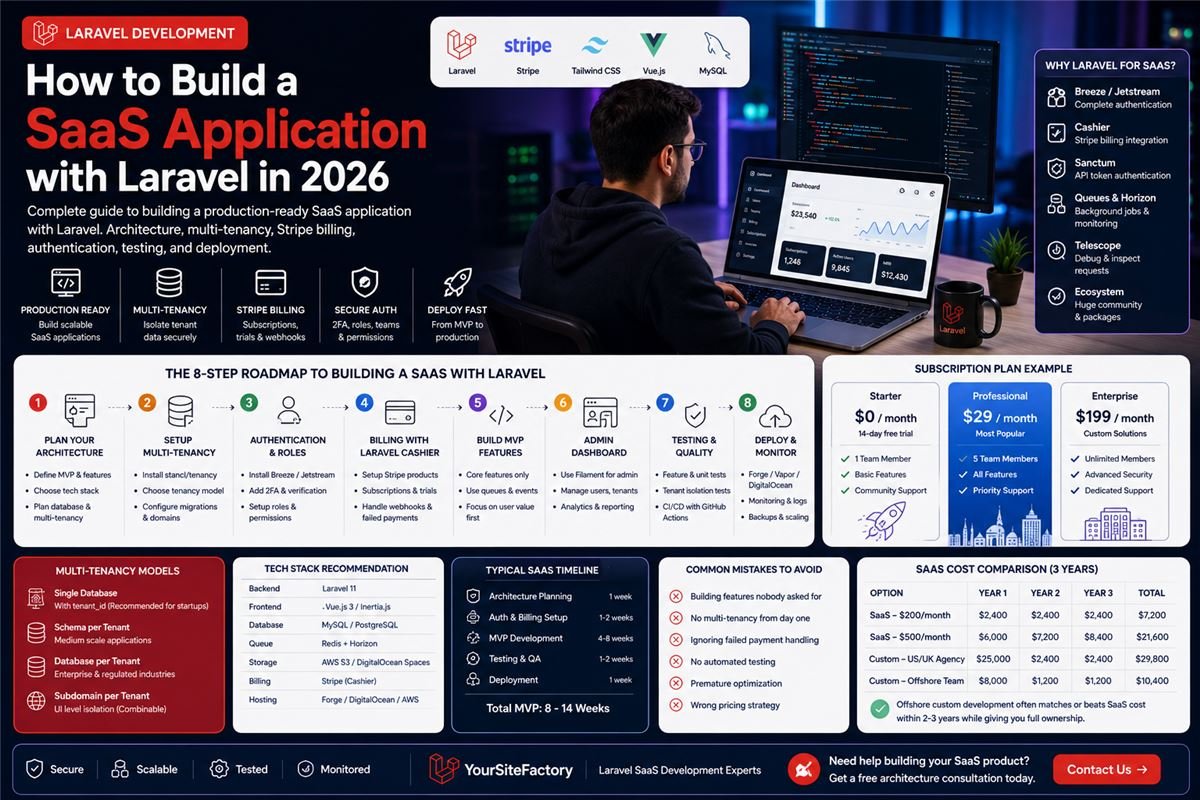
Every week another founder launches a SaaS product. Most fail not because the idea was bad, but because the technical foundation was wrong from the start.
Multi-tenancy breaks at scale. Billing logic has edge cases nobody planned for. The authentication system lacks two-factor support. The database was never designed for the queries the application actually runs.
This guide is the technical foundation you need to build a SaaS application with Laravel that actually works in production not just in development.
Why Laravel Dominates SaaS Development in 2026
Laravel is not just popular it is specifically designed for the problems SaaS applications face.
Real SaaS products built on Laravel:
- Forge Laravel's own server management platform
- Envoyer Zero-downtime deployment tool
- Flare Error tracking for PHP
- Mailcoach Email marketing platform
- Invoice Ninja Invoicing SaaS with millions of users
These are production SaaS products handling millions of requests. The framework clearly scales.
Why Laravel specifically:
- Authentication: Breeze and Jetstream provide complete auth login, registration, 2FA, email verification, password reset in minutes
- Queues: Background job processing for emails, reports, and file processing without blocking HTTP requests
- Cashier: Stripe and Paddle billing integration built and maintained by the Laravel team
- Sanctum: API token authentication for headless frontends and mobile apps
- Telescope: Development debugging and request inspection
- Horizon: Queue monitoring dashboard
Step 1 Define Your SaaS Architecture Before Writing Code
The most expensive mistake in SaaS development is starting to build before the architecture is clear. Answer these questions first:
Product questions:
- What specific problem does your SaaS solve?
- Who is your primary user persona?
- What is the absolute minimum feature set for launch (MVP)?
- What does success look like after 6 months?
Technical questions:
- Multi-tenancy model shared database or separate databases?
- Authentication requirements social login, SSO, 2FA?
- Billing model subscription, usage-based, or hybrid?
- API headless with React/Vue frontend, or traditional Blade templates?
- Expected scale 100 users or 100,000 users at launch?
Getting these answers takes one day. Changing them midway through development takes weeks.
Step 2 Choose Your Multi-Tenancy Approach
Multi-tenancy determines how your SaaS isolates data between customers. This decision affects your entire database architecture and cannot be changed easily later.
| Approach | Best For | Complexity | Data Isolation |
|---|---|---|---|
Single database with tenant_id | Startups, MVPs | Low | Medium |
| Schema per tenant | Medium-scale products | Medium | High |
| Database per tenant | Enterprise, regulated industries | High | Complete |
| Subdomain per tenant | Any (combinable) | Medium | UI level |
Recommendation for most startups: Single database with the stancl/tenancy package. Install it early retrofitting multi-tenancy later is painful.
composer require stancl/tenancy
php artisan tenancy:install
Step 3 Authentication and User Roles
Install Laravel Breeze for the cleanest authentication scaffold:
composer require laravel/breeze
php artisan breeze:install
php artisan migrate
Then add role management with Spatie's permission package:
composer require spatie/laravel-permission
php artisan vendor:publish --provider="Spatie\Permission\PermissionServiceProvider"
php artisan migrate
Standard SaaS role structure:
| Role | Permissions |
|---|---|
| Super Admin | Full platform access, manage all tenants |
| Account Owner | Manage subscription, invite team members |
| Admin | All features within their tenant |
| Member | Standard product features |
| Read Only | View only access |
Step 4 Subscription Billing with Laravel Cashier
Laravel Cashier is the official Stripe integration for Laravel. Install it:
composer require laravel/cashier
php artisan vendor:publish --tag="cashier-migrations"
php artisan migrate
Add the Billable trait to your User or Team model:
use Laravel\Cashier\Billable;

class Team extends Model {
    use Billable;
}
Essential billing features to implement:
// Free trial
$team->newSubscription('default', 'price_professional')
    ->trialDays(14)
    ->create($paymentMethod);

// Check subscription status in middleware
if (!$team->subscribed('default') && !$team->onTrial()) {
    return redirect('/billing');
}

// Handle failed payments via webhooks
// In routes/web.php
Route::post('/stripe/webhook', '\Laravel\Cashier\Http\Controllers\WebhookController@handleWebhook');
Recommended subscription plan structure:
| Plan | Price | Features |
|---|---|---|
| Free Trial | $0 / 14 days | Full access |
| Basic | $29/month | Core features, 1 user |
| Professional | $79/month | All features, 5 users |
| Enterprise | $199/month | Unlimited users, priority support |
Step 5 Build Your MVP Features
With auth and billing working, build only what delivers core value. The biggest SaaS failures come from over-building before validating.
Laravel features to use strategically:
// Queue everything slow
SendWelcomeEmailJob::dispatch($user)->delay(now()->addSeconds(5));

// Use events for decoupled logic
event(new UserSubscribed($user, $plan));

// Use notifications for multi-channel delivery
$user->notify(new TrialEndingNotification());

// Use policies for clean authorization
$this->authorize('update', $project);
The MVP rule: If a feature does not directly help users achieve the core value of your product, it does not belong in v1.
Step 6 Admin Panel
Every SaaS needs an admin panel. Options in 2026:
| Option | Cost | Setup Time | Customisation |
|---|---|---|---|
| Filament | Free | 2–4 hours | Excellent |
| Laravel Nova | $299 | 1–2 hours | Good |
| Custom built | Development time | Weeks | Complete |
Filament is the clear choice for most projects in 2026 it is free, actively maintained, and produces beautiful admin panels quickly.
composer require filament/filament
php artisan filament:install --panels
Step 7 Testing Strategy
A SaaS that breaks in production loses paying customers and their trust is nearly impossible to recover.
Minimum testing requirement:
// Test subscription creation
public function test_user_can_subscribe_to_basic_plan() {
    $user = User::factory()->create();
    $this->actingAs($user)
         ->post('/billing/subscribe', ['plan' => 'basic'])
         ->assertRedirect('/dashboard');
    $this->assertTrue($user->fresh()->subscribed('default'));
}

// Test tenant data isolation
public function test_tenant_cannot_access_other_tenant_data() {
    $tenant1 = Tenant::factory()->create();
    $tenant2 = Tenant::factory()->create();
    $this->actingAs($tenant1->owner)
         ->get("/projects/{$tenant2->projects->first()->id}")
         ->assertForbidden();
}
Run tests automatically on every commit with GitHub Actions:
- name: Run Tests
  run: php artisan test --parallel
Step 8 Deployment and Monitoring
Hosting options for Laravel SaaS in 2026:
| Platform | Monthly Cost | Best For |
|---|---|---|
| Laravel Forge + DigitalOcean | $12–$50 | Most startups |
| Laravel Vapor (AWS) | $50–$500+ | High scale, serverless |
| Heroku | $25–$250 | Simple setup, higher cost |
| Railway | $5–$50 | Developer-friendly |
Monitoring stack:
- Laravel Telescope Development debugging
- Laravel Horizon Queue monitoring
- Sentry Production error tracking (free tier available)
- UptimeRobot Uptime monitoring with alerts
- Papertrail Log management
SaaS Launch Timeline
| Phase | Duration | What Happens |
|---|---|---|
| Architecture planning | 1 week | Database design, tech decisions |
| Auth + billing setup | 1–2 weeks | Login, subscription, admin |
| MVP features | 4–8 weeks | Core product value |
| Testing + QA | 1–2 weeks | Bug fixes, edge cases |
| Deployment setup | 1 week | Server, monitoring, backups |
| Total MVP | 8–14 weeks | Ready for first paying customers |
Common Mistakes That Kill SaaS Projects
- Building features nobody asked for talk to 10 potential customers before writing code
- No multi-tenancy from day one retrofitting it later costs 3× as much
- Skipping failed payment handling involuntary churn kills SaaS businesses
- No automated testing every deployment becomes a risk
- Premature optimisation do not optimise for 100,000 users when you have 10
- Wrong pricing most SaaS founders underprice by 50–70%
FAQ Building SaaS with Laravel
How long does it take to build a SaaS with Laravel?
A focused MVP with authentication, billing, core features, and admin panel takes 8–14 weeks with an experienced team. Simple tools can launch in 4–6 weeks. Complex platforms take 16–24 weeks.
Is Laravel good for large-scale SaaS?
Yes. Laravel SaaS products handle millions of users in production. Proper use of caching, queues, database optimisation, and horizontal scaling handles any load.
How much does it cost to build a SaaS with Laravel?
A basic SaaS MVP costs $5,000–$15,000 with an offshore team. US or UK-based development costs $30,000–$100,000+. YourSiteFactory builds Laravel SaaS MVPs starting from $5,000.
Should I use Laravel Jetstream or Breeze?
Breeze for simple authentication. Jetstream if you need teams, profile photos, API tokens, and two-factor authentication out of the box. Most SaaS applications benefit from Jetstream.
What is the best admin panel for a Laravel SaaS?
Filament in 2026. It is free, beautiful, and faster to build with than Laravel Nova for most use cases.
Do I need multi-tenancy for my SaaS?
If multiple companies will use your product and their data must be isolated yes. Implement it from day one using the stancl/tenancy package.
Final Thoughts
Building a successful SaaS with Laravel in 2026 is about making the right architectural decisions early, building only what delivers core value, and getting to paying customers as fast as possible.
The framework gives you everything you need. The challenge is discipline not building too much, not skipping tests, not ignoring the billing edge cases.
YourSiteFactory specialises in Laravel SaaS development for founders and businesses in USA, UK, Canada, Australia, and Qatar. We have built production SaaS applications from MVP to scale. Contact us for a free architecture consultation.